eobdtool

eobdtool
VVDI MB Key Tool
Showing posts with label Xhorse VVDI Prog. Show all posts

4/19/2017

Audi A6L all key lost new key made by VVDI2 and VVDI PROG

This blog will show you steps for VVDI2 Commander and VVDI PROG Key Programmer work together to make a new key for Audi A6L all key lost.
Step1. Open Audi A6L engine cover, find the engine and disassemble it. Remove the engine ECU.

Warm up the ECU edge to open ECU safely, find the 95320 chip as below, desolder the chip and put it on VVDI PROG to read data.

Step2. Open VVDI PROG software, choose correct “Type”, “Brand” and “Chip” at right side. Click “New” and “Read” then “Save” to save the bin file. Remove the chip 95320 from VVDI PROG, solder it back to engine ECU and reinstall ECU to Audi A6L.
Step3. Open Xhorse VVDI2 software and choose “Audi” option. Click “Special Function” on top menu bar. Then click “EEPROM Data Processing Tool”. First you need to calculate the CS code: choose “EEPROM Simons PPDIx- Reset component protection data”.

Step4. Click “Read” and load the bin file that is read out just now, click “Open”. And you can see the CS code as picture, record it with your camera or pen.

Next is to calculate the PIN code. Back to “EEPROM Data Processing Tool” dropdown menu and choose “EEPROM Simons PPDIx- Security Access Code”. Click “Read” and load the bin file, PIN code is read out. Record the code.

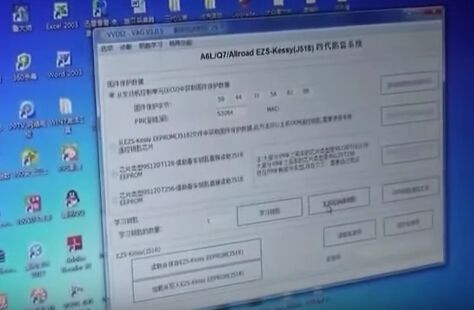
Step5. Back to Xhorse VVDI2 software main menu; choose “Key Learning” and “Audi A6/A7” option. Input the CS code and PIN code then you can see the buttons “Learning Key” and “Generate Dealer Key” are working.
Put a new remote key chip into VVDI2 coil. Click “Generate Dealer Key” and it will show success soon.
Step6. This step is going to learn key. Disconnect the short insurance line and connect it again.

Now take out the remote chip and put it close to car’s ignition data coil. Open and close the car door. Turn on ignition and press down brake. Click “Learning Key” and you can see learning success.
Step7. This is the last step: read out EZS-EEPROM (J518) EEPROM to generate the OEM remote control.
Choose chip type “9S1201128” then save EZS-EEPROM (J518) EEPROM file. And start to generate the OEM remote control.
Choose the EEPROM file to open then put the remote control vertically into VVDI2 coil. Click “Open” and “Next”.

The OEM remote control is generated successfully! Assemble it to the new key and test. Now Xhorse VVDI PROG Programmer and VVDI2 Tool together make a new key successfully for Audi A6L all key lost! The car will start and the remote function will work!

4/14/2017

How VVDI PROG Programmer read BMW CAS2 CAS3 CAS3+ CAS4 ECU?

This blog will show you how use VVDI PROGProgrammer to read BMW CAS2 2K79X, CAS3 OL15Y, CAS3+ OM23S, CAS4 5M48H ECU separately with clear wiring diagrams.

How VVDI PROG read BMW CAS2 2K79X?
1.     Open VVDI PROG software, you can see “Immobilizer Types”, “Car Makes” and “ECU Types”. Choose “4-IMMO”, “BMW” and “CAS2 2K79X”.
2.     It will show you a wiring diagram, follow it to solder and connect cables to CAS2 ECU.
3.     Click “New” on toolbar then click “Read”. The device id initializing. Then click “Yes” to crack chip.
4.     Wait and VVDI PROG read BMW CAS2 2K79X successfully. Save the bin file.

How VVDI PROG read BMW CAS3 OL15Y?
The procedure is similar. Here is BMW CAS3 OL15Y wiring diagram for you:

How VVDI PROG read BMW CAS3+ OM23S?
The procedure is similar. Here is BMW CAS3+ OM23S wiring diagram for you:

How VVDI PROG read BMW CAS4 5M48H?
The procedure is similar. Here is BMW CAS4 5M48H wiring diagram for you:

That’s all this blog about how Xhorse VVDI PROG read BMW CAS. Hope it helps!


4/13/2017

Xhorse VVDI Prog V4.5.6 Newest Update Software Free Download

Good news, Xhorse VVDI Prog has been update to newest version V4.5.6. This new version fix MC9S12G192,MC9S12GA19 bugs and add PIC16F631,PIC16F636 models, ect. Here is Xhorse VVDI Prog V4.5.6 Newest Update software download link for you

Xhorse VVDI Prog V4.5.6 Download link:
https://mega.nz/#!jpoEhToS!m9NoYIAhL...VWFwxb7W_VlAL8
password:123456


VVDI PROG V4.5.6 (2017-03-21)  *This version don't need update firmware:
* Fix some bugs
+ Add VVDI PROG USER MUNUAL 4.5.6
version in Doc folder
+ Support operate software while
opening the diagram
* Fix MC9S12G192,
MC9S12GA19,
MC9S12G240,
MC9S12GA240 options
PFLASH write error problem
+ Add PIC12F635,
PIC12F683 options
in <2-MCU>->

+ Add PIC16F631,
PIC16F636,
PIC16F639,
PIC16F677,
PIC16F684,
PIC16F685,
PIC16F687,
PIC16F688,
PIC16F689,
PIC16F690 options
in <2-MCU>->

+ Add JIEFANG-J6-BCM option
in <4-IMMOBILIZER>->
(Need to use with VVDI2)
+ Add FC-OPERATION-UNIT-W221
option in <8-OTHER>->

More information, please check on http://www.eobdtool.co.uk/wholesale/vvdi-prog-programmer.html

What's the Difference between VVDI Prog and VVDI2 Key Programmer

VVDI Prog and VVDI 2 is multifunctional platform released by Xhorse company, mainly for automotive maintenance.

But sometimes few customer will feel confused about them, here we will try to help you distinguish them.

Function:
VVDI Prog:
Program EEPROM
Program ECU
Program MCU
Pin Code Calculation

VVDI 2:
Diagnose
Odometer correction
ECU programming
Key programming
Key learn
Etc.

Tool function covered:
VVDI Prog:
VVDI PROG=(BMW ISN READ)+(EERPOM read)+(mcu read MOTO 9S12,5M48****)+PIN Code Calculation(more pin coder Algorithm, than 40 type)

VVDI 2:
VVDI 2=VVDI options 
+ BMW Multi Tool options
+Porsche options+J2534(free)
+Tango(free)+
Remote control generation(free)…..more other function

simply says
VVDI Prog is mainly used to read and write chips
VVDI2 support diagnosis, key programming and odometer correction


VVDI2 and VVDIProg is perfect combination, they usually use together

You can buy Xhorse VVDI 2 Full Version Plus VVDI Prog in value bundle kit
 

How to Update Xhorse VVDI Prog Online

Xhorse VVDI Prog Super Programmer built-in update software allows user to update VVDIProg firmware timely. VVDI Prog firmware support update as well, here we will show you how to update VVDI Prog Software and Firmware.

1. This function require internet support, Connect the device with the USB wire for the computer
2. Click the “Upgrade” button enter the upgrade interface, show as following picture


Enter update interface, if software show ”communication with server failed”,
please close your Anti-virus and computer firewall and retry. If software
show “unable to find equipment”, please reconnect device
Tip information show the latest software version and upgrade information
Device information show the device SN, device firmware version and the
latest firmware version
Firmware upgrade steps:
1. Select the firmware version
2. Click “Start Firmware Upgrade” button
3. Don’t close or pull out USB cable before upgrade finished
Software upgrade steps:
1. Click “Software Link 1” or “Software Link 2” button, download software
from the web
2. Extract the file

More information, please check VVDI Prog here: http://www.eobdtool.co.uk/wholesale/vvdi-prog-programmer.html