eobdtool

eobdtool
VVDI MB Key Tool

7/05/2016

Free download Xhorse VVDI MB BGA Tool V2.1.1

Free download Xhorse VVDI MB BGA Tool V2.1.1 (Password: 123456)
Latest update news: VVDI MB BGA Tool V2.1.1 is available for you! Mate, you can check this free link to download.
https://mega.nz/#!ywRAkS5C!Imp2PyIpbIt5DxZOINn8tJUQr1HdPiR0GWEsSyKYWs8
What’s new for VVDI MB Tool V2.1.1?
  1. Attention: All user update device to firmware v2.1.1, software v2.1.1
  2. Add connection diagram for new NEC key adaptor
  3. Support repair W204 ESL fatal error and repair old Motorola ELV. You need buy an extra adaptor for ESL
  4. Bug fix
Get more information about VVDI MB BGA Tool from:


This is from www.eobdtool.co.uk website technical support:Free download Xhorse VVDI MB BGA Tool V2.1.1

7/04/2016

How VVDI MB BGA tool renew EIS and replace ESL for Mercedes Benz?

In general, Benz electric steering locks (ESL) are used with EIS W204/ W207/ W212. ESL is damaged in high frequency. In this case, there are two possible reasons and solutions:
  1. If the ESL motor is damaged, replace a new motor.
  2. If the NEC chip of ESL is locked, renew EIS then replace ESL.
How to tell if the ESL motor is damaged or NEC chip is locked?
Open VVDI MB tool software. Click “Check ESL damage status”.

  1. If it shows ESL works normally, generally it means the EIS motor is damaged and you need a new one.
Replace a new motor, what need to buy?
--OEM MB ESL motor+ MB ESL dowel pin+ MB EIS removal tool
This full kit of MB ESL motor is available at:

  1. If it shows that ESL is damaged, then replace ESL.
This new ESL/ ELV emulator is recommended for your replacement:
     

How to replace ESL with VVDI MB BGA Tool?
Step1. To replace ESL, you need renew EIS at first, then re-write EIS and personalize ESL, in this way ESL is synchronized. To renew EIS, both key password and erase password are required.
Note: if you do not renew ESL first, but only personalize ESL, the ESL won’t be synchronized.
  • Get key password. You can increase key to get it.
Use VVDI MB NEC Key Adaptor to work with VVDI MB BGA tool to get key password.

  • Get erase password. In general, we can get the password directly with VVDI MB tool online calculation from server.
  • After input the two passwords choose “Infrared” as EIS communication way, then click “save EIS data”, Click "Renew EIS".

Step2.
  • Now the EIS is full new, click “load EIS data”, click “Infrared” as communication way to enter new EIS data.
  • Click “OBD” as communication way to enter VIN.

Step3. Click “Personalize W204 ESL”

Step4.
After above steps, all EIS and ESL status checkboxes will be tick except the “Activated” checkbox. Insert the original car key hen EIS and ESL is activated. Now you use VVDI MB tool to renew ESL successfully.

Note:
It’s hard to buy Mercedes W204/207 EIS and they are expensive. If you have W204/ 207 all key lost, you can use W212 EIS for replacement.

6/07/2016

How Xhorse VVDI RKE BOX Program Remote Key for KIA K3  

Xhorse VVDI RKE BOX is successfully tested ok to program remote key on Kia K3. Working together with VVDI2 and mini remote programmer, Xhorse VVDI RKE BOX is able to change the original straight key to folding key. How they work? Please go on reading following parts.

Two optional remote key for this test:
  1. Xhorse VVDI RKE BOX 6V/9V/12V
   

  1. Xhorse VVDI RKE BOX 3V


Xhorse VVDI RKE BOX’s Application
  1. To change the original straight key to folding key.
  2. Temporarily to add a new remote control or replace original remote control
  3. Only one remote for the original car (such as the Chinese, Besturn, etc.)
  4. To seek low-cost remote control instead of the expensive original one
Note: at least one original remote control for use of the kit
The Original Straight Car Key: (with ID70 Electronic Chip )

Connecting Diagram: How Xhorse VVDI RKE BOX connect with VVDI2 and mini remote programmer
Xhorse VVDI RKE BOX Matching Steps:
  1. Press SET button on the Host box (in the internal hole at the side of unit), then the buzzer beep twice, to go into the matching state
  2. Press any button on the new remote for a while until the buzzer beep continuously. Key matching is completed.
  3. Repeat the previous two steps to add another new key.


  1. Buzzer
  2. Key to be added
  3. SET button
Xhorse VVDI RKE BOX Program New Remote Key by OBD

There are several points as follows can be proved after test:
  1. VVDI RKE BOX can program remote key correctly without any functional error.
  2. The remote control distance can be as long as100 meters.
  3. Comparing with the original straight key, Xhorse VVDI RKE BOX makes user more satisfied by better handfeel.

How Xhorse VVDI RKE BOX Program Remote Key for New Alto

Xhorse VVDI RKE BOX is tested working fine to program remote key for New Alto. Working together with VVDI2 and mini remote programmer, Xhorse VVDI RKE BOX is able to change the original straight key to folding key. How they work? Please go on reading following parts.


Two optional remote key for this test:
  1. Xhorse VVDI RKE BOX 6V/9V/12V
   

sk187-b(01)
  1. Xhorse VVDI RKE BOX 3V

 sk187(01)
The Original Straight Car Key: (with ID46 Electronic Chip )

Connecting Diagram: How Xhorse VVDI RKE BOX connect with VVDI 2 and mini remote programmer
 Programming New Remote Key Manually with Xhorse VVDI RKE BOX
Step 1: Open the car door by driver’s seat while keep other doors close.
Step 2: Insert car key into ignition lock cylinder, turn the key to the “ON” position. Pull out the key within 10 seconds.
Step 3: Press and release door lamp switch beside driver’s seat for 3 times and this action should be done within 20 seconds.
Step 4: Repeat Step 2.
Step 5: All car doors automatically close and open for one time. Press the “Unlock” button of remote key and all doors will automatically close and open for one time. Now the new remote key is programmed successfully.
There are several points as follows can be proved after test:
  1. VVDI RKE BOX can program remote key correctly without any functional error.
  2. The remote control distance can be as long as 100 meters.
  3. Comparing with the original straight key, The folding key makes user more satisfied avoiding prick user’s leg in pocket.


Xhorse VVDI RKE BOX Test Report: Program Remote Key for Honda CRV

Xhorse VVDI RKE BOX is successfully tested ok to program remote key on Honda CRV. Working together with VVDI2 and mini remote programmer, Xhorse VVDI RKE BOX is able to change the original straight key to folding remote key. How they work? You can check following parts.

Two optional remote key for this test:
  1. Xhorse VVDI RKE BOX 6V/9V/12V
   

  1. Xhorse VVDI RKE BOX 3V


The Original Straight Car Key: (with ID46 Electronic Chip )

Connecting Diagram: How Xhorse VVDI RKE BOX connect with VVDI2 and mini remote programmer

Programming New Remote Key Manually with Xhorse VVDI RKE BOX

Step 1: Insert car key into ignition, turn ignition on and press the”Lock” button on remote controller, then turn ignition off.
Step 2: Turn ignition on for the second time, press the”Lock” button on remote controller, then turn ignition off.
Step 3: Repeat Step 2 twice.
Step 4: After center console has reaction, press the “Unlock” button to finish programming.
If you want to program two remote keys, other steps are the same. But Step 4 should be like that: press both sides of the “Lock” button for one key, center console has reaction, then press the “Lock” button twice for another key.
Xhorse VVDI RKE BOX can program remote box and chip separately While the original key’s remote function will work automatically when car star.
 There are several points as follows can be proved after test:
  1. VVDI RKE BOX can program remote key correctly without any functional error.
  2. The remote control distance can be as long as 20 meters.
  3. Comparing with the original straight key, The folding key makes user more satisfied avoiding prick user’s leg in pocket.


5/10/2016

How to program a new EIS with VVDI (W204 and W221 All key lost)

Q: I bought EIS W221 lock with a key from the lock from one machine. I have read the PSW. I will make a complete loss of W221 key in the future?
Describe step by step procedure:
A: you have uesd/2nd-hand EIS with working key,you can do like this for W221 all key lost
1.read all key lost EIS data-> save EIS data
2.read used EIS data enter password,get erase password->renew used EIS.
3.load step1 EIS data to renewed EIS with password->write EIS data
4.load EIS data(with key password)->prepare key file
5.input new key to device IR reader->load key file->write
6.insert new key to EIS->EIS will learn the new key->key learn successby the way,if your all key lost W221 is motorola EIS,not need to change EIS,remove eis get eeprom by programmer(VVDI PROG).
then load eeprom to VVDI MB TOOL prepare key file.Q: I have a w204 All key lost and i program a new EIS with VVDI, the ignition doesn't come on or crank, but the steering can lock and unlock. can someone guide me what to do?
A: about W204 all key lost(change new EIS),refer to following steps,maybe helpful:
1.Read EIS data via obd,then Save EIS data
2.adapt ESL:Read ESL data->Get Erase Password->Renew ESL
3.Change new EIS, Load EIS data(step1)->write Key Password(enter manually and at random)->Write EIS data
4.Personalize W204 ESL
5.Load EIS data(with Key Password)->Prepare Key File
6.Input new Key to device IR reader->Load Key file->write
7.Insert new Key to EIS->EIS will learn the new key->key learn success
Xhorse V2.0.8 VVDI MB BGA Tool VVDI Key Programmer for Benz BGA Key Calculation
Item No. SK185  : €1,819.00
VVDI MB Tool is powerful Mercedes Benz Key Programmer, can calculate Benz BGA key password and add new BGA Keys, support all Benz keys after year 2011. Newest Update VVDI Benz can read EIS under OBD mode will check car power automatically. Avoid lost data in EIS
Latest VVDI Prog V4.4.3 Super Programmer with Free BMW ISN read function and NEC, MPC, Infineon

Item No. SK177 : €385.00
Latest VVDI Prog V4.4.3 Super Programmer built-in update software allows user to update VVDIProg firmware timely, read the common EEProOM via 16pin locking socket. Buy VVDI-Prog Programmer, get free BMW ISN read function and NEC, MPC, Infineon etc chip continously update service
2016 Newest 1.1.2 VVDI2 VVDI 2 Commander Key Programmer Full Version Update Online for VW/Audi/BMW/Porsche
Item No. SV86  : €2,169.00
VVDI2 Commander is update version of VAG VVDI Diagnostic Tool, newly add BMW Porsche model, added plug-in function and reserved connectors to include all VVDI functions. VVDI 2 support IMMO programming for part vehicles.

4/05/2016

VVDI MB TOOL Latest software V2.0.7 version update details

Original Xhorse VVDI MB TOOL 2016-02-26 update
Require firmware V2.0.7
BENZ V2.0.7 update:
  1. Attention: All user update device to firmware v2.0.7, software v2.0.7, the lower version dont support password calculation
  2. User manual v1.2 released, overview v1.3 released
  3. Add support for renew ECU/Gearbox/ISM etc
  4. Fix diable key in K-Line protocol
  5. Fix clear TP in K-Line protocol
  6. Fix read key bug in password calculation
  7. Bugfix
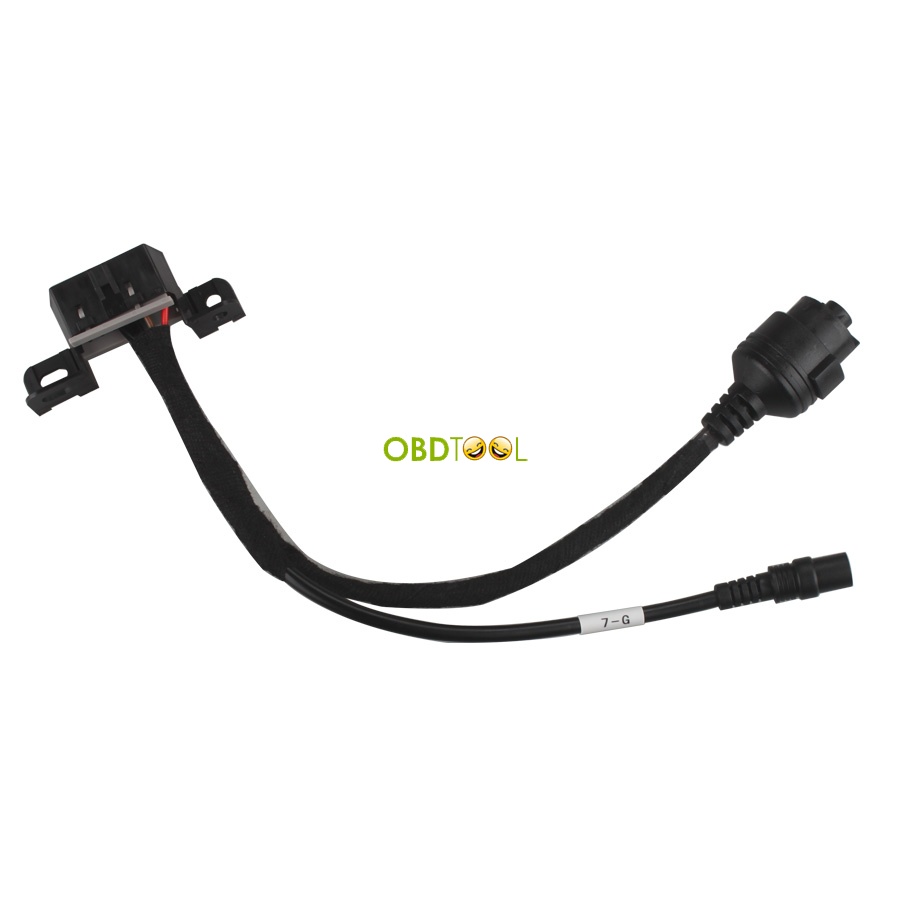
VVDI MB TOOL newly suppport M21 cable and 7-G cable:
M21 cable looks like this:

7-G cable looks like this:


VVDI MB TOOL V2.0.7 update Tips:
Q: i have a problem with update, the update blocked at 49% to begin to second part .
A: in fact your device online update(update firmware)success,you can use it as normal.
update firmware include 2 part.49% means part 1 success,part 2 same as old version.
this few days we are testing/debug our server.later will be ok about firmware update failed at 49% issue.
Q: what to do the update is stable at 49% is it safe to close the software ?? Can i disconnect the device thank u
A: you can closed the software it's safe for you, your update is ok at 49%, it's just one bug of the server from vvdi bga tool.
VVDI MB TOOL Feedback:
I use it and sell some to my clients. Very handy and very good tool to test if your keys and EIS working before going back to the vehicle. Sometimes ESL have fault then EIS won't turn, but when use test platform you know problem is not EIS and only ESL or other problem on car.
Buy it if you always make benz keys.